Product Features
Everything you need to understand your users
LogNroll provides powerful tools to help you understand user behavior, fix bugs, and improve your product.
Everything in one platform
LogNroll provides powerful tools to help you understand user behavior, fix bugs, and improve your product.
Session Replay
Watch exactly what users do on your site, including clicks, scrolling, and form inputs.
- See user interactions in real-time
- Identify UX issues quickly
- Understand user behavior patterns
- Debug issues with full context
Heatmaps
See where users click across many sessions—overlaid on the same pages you replay.
- Click heat overlay in the session player
- Separate views for mobile, tablet, and desktop
- URL-normalized aggregation across sessions
- Jump from hotspots to the sessions behind them
Error Tracking
Automatically capture and track errors, with full stack traces and user context.
- Real-time error monitoring
- Full stack traces
- User context for each error
- Error grouping and prioritization
Product Analytics
Understand user behavior with powerful analytics and funnel tracking.
- User journey analysis
- Conversion funnel tracking
- Custom event tracking
- Behavioral analytics
MCP for AI Agents
Give Cursor and other AI agents scoped, read-only access to raw session data through the Model Context Protocol.
- Nine tools: sessions, events, errors, network, heatmaps
- OAuth email-code login, no API keys
- Scoped to your team’s companies
- Read-only — agents analyze, never modify
Sessions
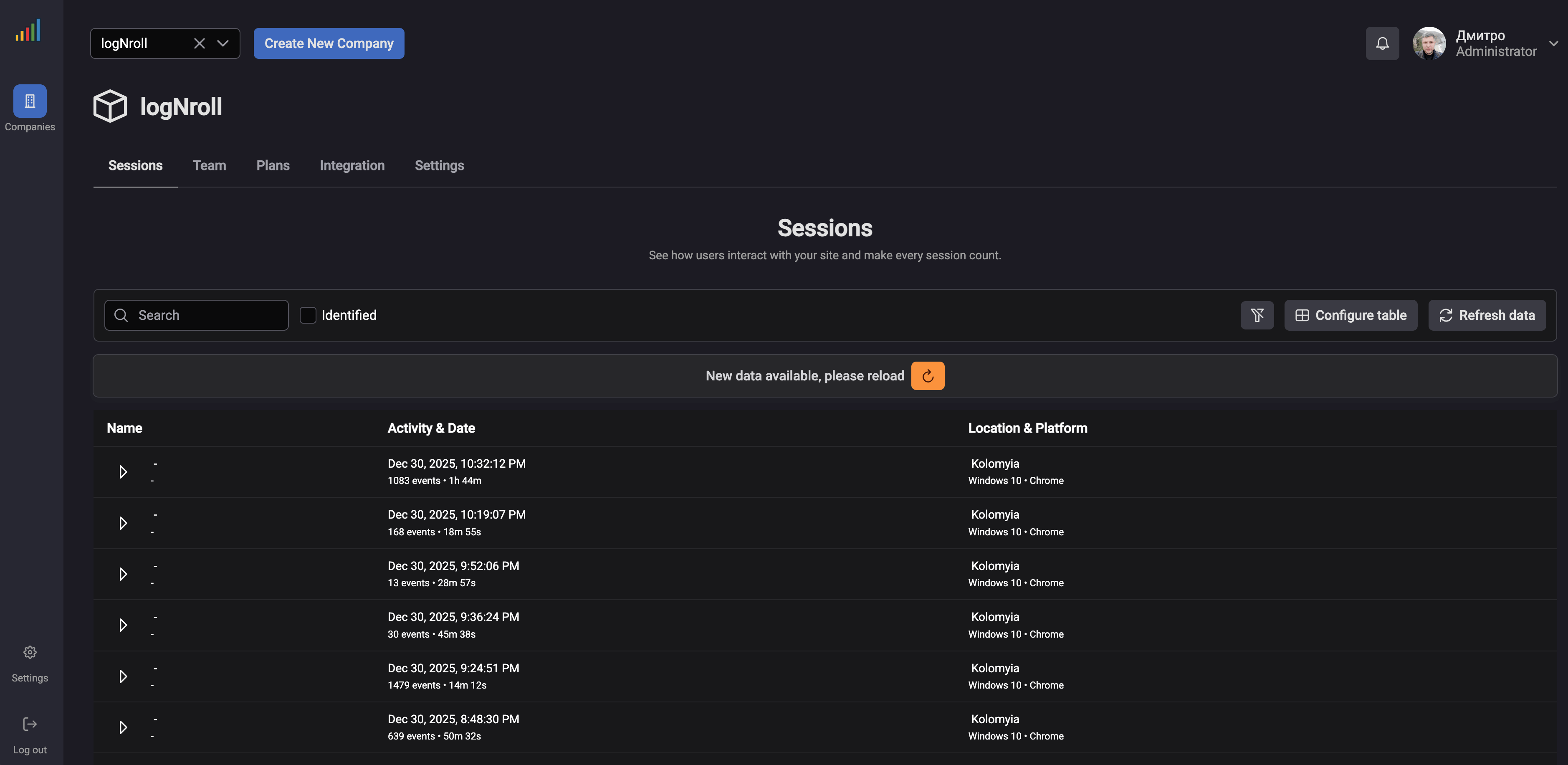
Sessions Dashboard: Manage and Analyze User Sessions
The LogNroll Sessions Dashboard provides a comprehensive view of all user sessions, making it easy to find, filter, and analyze the sessions that matter most to your team.
- Search & Filter: Quickly find sessions by user, date, location, platform, or custom criteria. Filter by identified users, specific time ranges, or events.
- Session Details: View activity timestamps, event counts, session duration, user location, and platform information at a glance.
- Table Configuration: Customize the table view to show the columns and information most relevant to your workflow.
- Real-time Updates: Get notified when new session data is available and refresh to see the latest user activity.
Replay
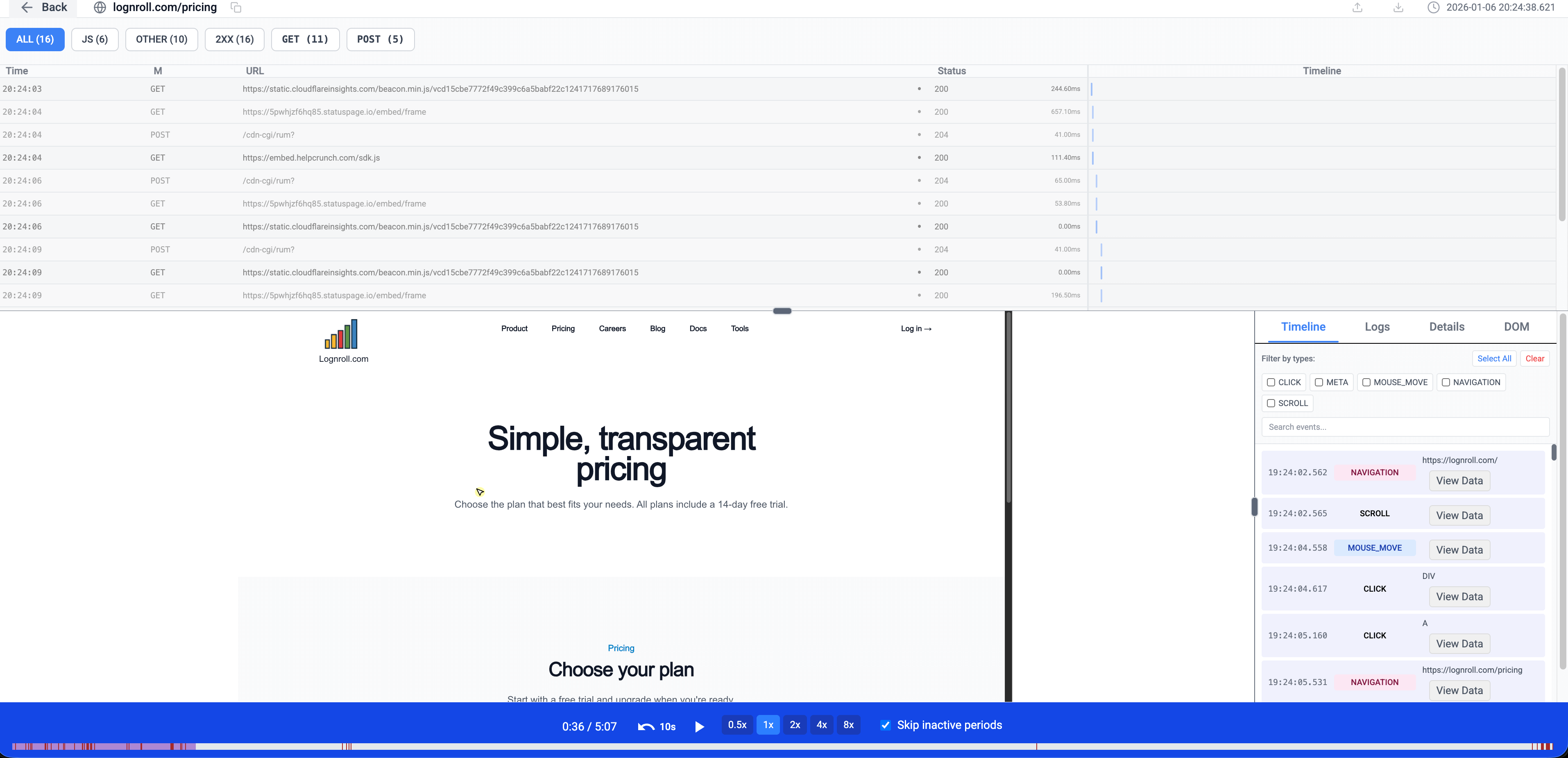
Session Replay Player: Deep Dive into User Sessions
The LogNroll Session Replay Player provides a powerful interface for analyzing user sessions with synchronized network requests, event timelines, and precise playback controls.
- Network Monitoring: View all network requests in real-time with detailed timing, status codes, and response times. Filter by request type, status, or method to focus on specific issues.
- Event Timeline: See every user interaction including clicks, mouse movements, scrolls, and navigation events. Filter by event type and search through the timeline to find specific actions.
- Advanced Playback: Control playback speed (0.5x to 8x), skip inactive periods, and navigate precisely through the session with 10-second jump controls.
- Synchronized Analysis: Network requests, user events, and visual replay are perfectly synchronized, allowing you to correlate user actions with network activity and understand the complete context.
Signal, not noise
Heatmaps: Spot Friction Across Many Sessions
Toggle heatmaps in the session replay player to see aggregated click intensity on the current page. Find ignored CTAs, dead zones, and rage-click clusters—then open individual replays to understand why.
- Player overlay: Enable Heatmap in the player controls to draw click intensity on top of the live page reconstruction.
- Device separation: Clicks are stored by device type (mobile, tablet, desktop) so layouts do not mix across breakpoints.
- Stable page URLs: Query strings and hashes are stripped so tracking parameters do not fragment the same page into many heatmaps.
- Replay workflow: Use heatmaps to prioritize where to look, then watch sessions for the exact sequence that caused friction.
Hosting Options
Choose the deployment that fits your needs
LogNroll offers flexible hosting options to meet your security, compliance, and infrastructure requirements.
Cloud Hosting
Get started instantly with our fully managed cloud service. No infrastructure setup required.
- Fully managed infrastructure
- Automatic scaling and updates
- 99.9% uptime SLA
- Global CDN for fast performance
- Regular backups and monitoring
- 24/7 support included
Self-Hosting
Deploy LogNroll on your own infrastructure for complete control and data sovereignty.
- Full data control and privacy
- Deploy on-premises or private cloud
- Docker and Kubernetes support
- Compliance with data regulations
- Customizable infrastructure
- Enterprise support available
Need help deciding? Compare plans or contact our team.